


Appy Weather: Radar & Widgets
3.3652.00 Reviews
App Specs
- Version
- 2.0.20.1
- Updated On
- License
- Free
- Downloads
- 100,000+
- Developer
- Third Culture Apps
- Categories
- Weather
- Platform
- Android
Screenshots
 Analysis by AppCompare
I find weather apps most useful when they help me make a small decision quickly: whether to leave early, bring a layer, or move an outdoor plan indoors. Appy Weather is built around that kind of glanceable planning. It is a free weather app from Third Culture Apps, and its personal-feeling forecasts and live radar make it appealing if you want more than a bare temperature reading without turning every check into a deep dive.
A Fresh Take on Weather Apps
First things first, Appy Weather isn’t your typical weather app. It's like the cool, laid-back cousin in the family of weather apps. From the moment you open it, the interface feels inviting. It’s sleek, minimalistic, and doesn’t bombard you with unnecessary data right off the bat. Instead, it gives you exactly what you need in a straightforward way. The app’s design is truly on point, making it a joy to use.
Friendly Features That Stand Out
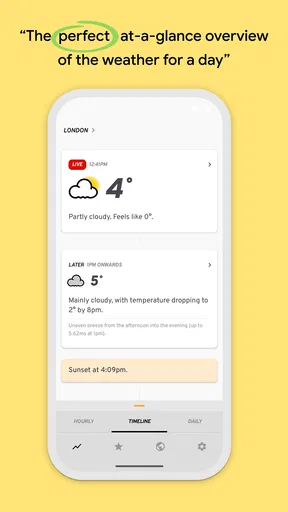
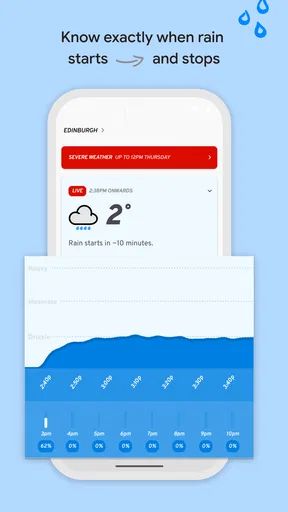
What really sets Appy Weather apart is its "Timeline" feature. This is where the app shines. It's like having a personal weather assistant that tells you what's happening now and what to expect throughout the day. You’ll see phrases like "Light rain starting in 10 minutes" or "Clear skies for the next hour." It’s these little snippets of info that make planning your day so much easier.
Another cool feature is the "Feels Like" temperature. We all know that sometimes the actual temperature isn't the best indicator of how it really feels outside, right? With this feature, you get a more realistic idea of what to expect when you step out the door.
Usability and Design
The app is incredibly intuitive, which is a blessing for those of us who aren’t tech-savvy. Navigating through the settings is a breeze, and you can customize the app to show the data you care about most, whether it’s hourly forecasts, daily summaries, or alerts for severe weather conditions. The color scheme is easy on the eyes, which is a big plus for frequent checkers like me.
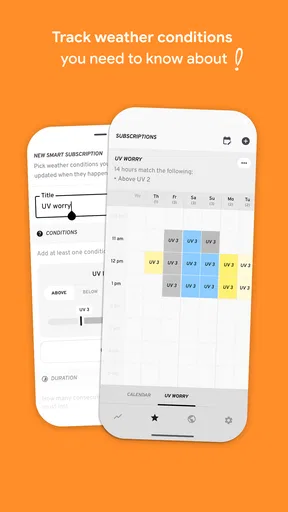
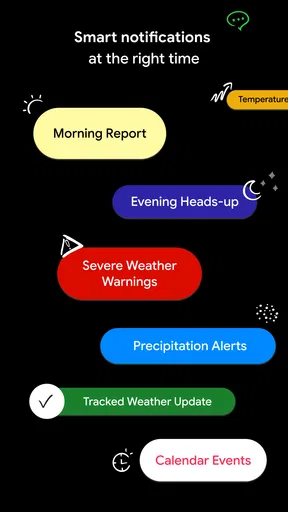
And let me tell you, the notifications are spot on. I love how the app keeps me in the loop without being intrusive. It’s like it knows just when I need a heads-up, whether it's about a sudden change in the weather or a reminder to grab a jacket.
Using forecasts without over-trusting them
A useful way to read the Timeline is as a guide to the next decision, not a promise about every minute. If I’m deciding whether to walk to a nearby shop, a short-term rain indication is directly actionable. For a long drive or an event several days away, I’d treat the forecast as provisional and check it again closer to departure. Weather can shift, and a neatly worded estimate can feel more certain than it really is.
Worth Reading Before You Choose

EA SPORTS FC Mobile 26 Is a Bigger Football Game, but It Takes Time

Flipboard Shows What News Apps Must Do Beyond the Feed

Switching to Android Auto Means Rethinking Your Driving Routine

Google Calendar Makes a Crowded Week Easier to Manage

Ludo King Makes the Most of the Minutes Between Plans

Baby Panda World Brings Quick Play to Modern Phones, but Its Game Library Feels Busy
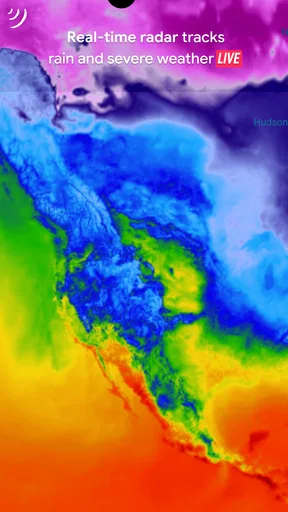
The live radar is valuable for a different reason: it gives a visual sense of precipitation nearby rather than asking me to rely only on a sentence or an icon. I’d use it to judge whether a shower appears to be approaching or moving away, then leave a little margin before committing to an outdoor plan. Radar is context, not a guarantee that a particular street or exact minute will stay dry.
There’s also a practical difference between checking the app once and making it part of a routine. I’d set up the view around the details I actually use, then check the Timeline before leaving and the radar only when rain could change the plan. That avoids turning a simple forecast check into repeated scrolling. If notifications are enabled, I’d keep only the alerts that would change what I do; a useful warning is easy to miss when every minor update competes for attention.
Accuracy and Performance
Here’s the thing—accuracy is key when it comes to weather apps, and Appy Weather doesn’t disappoint. The app sources its data from reliable weather providers, ensuring that the forecasts are as precise as possible. I’ve tested it over a couple of weeks, and it’s consistently been on the money. Rain or shine, you can count on it to give you the lowdown.
Performance-wise, the app is smooth sailing. I haven’t encountered any glitches or lag times, which is impressive considering some weather apps can be pretty sluggish. It’s fast, responsive, and doesn’t drain my battery life, which is a huge win in my book.
Trust, settings, and sensible limits
Weather apps deal with information about where I am, so I prefer to think carefully before enabling location access or notifications. I would review the permission prompts on my device and choose the location option that fits how I use the app; if I only need a forecast for a planned outing, entering or selecting a place when needed may be preferable to continuous location access. The available choice depends on the device’s settings, so I would check there rather than assume a particular control exists inside the app.
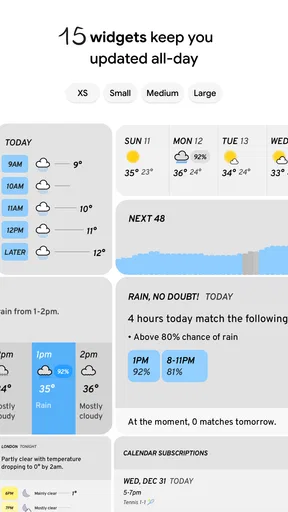
The app’s rich widgets can make routine checks more convenient by putting a forecast where I can see it without opening the full app. That convenience is a trade-off: a widget can expose weather information on a shared or visible screen. I’d choose a placement that suits my privacy and home-screen habits, and remove it if I rarely use it. Similarly, notifications are optional in the sense that I can manage them through device settings, and I’d enable them only if timely alerts are genuinely useful to me.
Appy Weather is rated for Everyone, has a 3.2 average from around 2.8K ratings, and has passed 100K installs. Those figures suggest it has found an audience, but the rating also makes me cautious about treating my own positive experience as universal. It was released on June 3, 2019, and version 2.0.18 is the current version. It runs on Android 8.0 or later; people using another platform should check compatibility in the relevant app store before planning around it.
The app is free to download, with in-app purchases ranging from $0.99 to $99.99 per item. I’d check the purchase details in the app before paying for anything, especially if I only need basic day-to-day forecasts. The free starting point makes it easy to try the interface, but it does not mean every optional feature or purchase will suit every budget. I also wouldn’t assume that the price range alone explains what each item offers; the purchase screen is the place to judge whether an option is worthwhile for my own use.
Where it fits among weather apps
Compared with a typical built-in weather app, Appy Weather feels more focused on translating conditions into a day plan: the Timeline, radar, widgets, and notifications give several ways to check what may matter next. A standard phone forecast can still be the better choice if I just want the temperature with no setup, purchases, or extra interface to learn. If I need specialist tools for hazardous conditions or highly detailed meteorological analysis, I’d look for an app designed for that purpose instead of treating this one as a substitute.
It suits people who check the weather in short bursts, adjust errands around showers, or want a quick view on a home screen. It is less compelling for someone who rarely changes plans based on weather, dislikes notifications, or wants every forecast detail presented at once. I’d also avoid relying on any consumer forecast as the sole basis for a safety-critical decision; for severe conditions, I would seek official local alerts and use the app as an additional everyday reference.
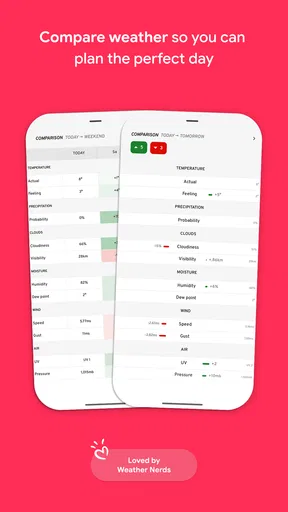
One realistic routine is checking the Timeline over breakfast before a walk, then glancing at radar if rain looks likely. If the shower seems close, I might take a jacket or shift the walk rather than cancel it outright. For an outdoor gathering later in the week, I’d use the daily outlook to start thinking through options but revisit it nearer the event. That is where the app’s concise presentation helps, while the changing nature of weather remains an important limit.
Final Thoughts
All in all, Appy Weather has quickly become my go-to weather app. It’s simple, reliable, and does exactly what it promises. Whether you’re planning a day out, need to know if you should take that umbrella, or just want a quick weather update, this app has got you covered. So, if you’re on the lookout for a weather app that’s both informative and enjoyable to use, I’d say give Appy Weather a try. Trust me, you won’t regret it!
I’d recommend trying it if the Timeline and radar match the way you plan your day, while keeping location and alert choices deliberate. Its clean approach is a real strength, but the modest average rating is a reason to test it yourself rather than assume it will suit everyone. For a quick, personal-feeling forecast it is worth considering; for specialist forecasting, minimal data exposure, or a completely free experience without optional purchases, another approach may fit better.
Pros
- Intuitive and clean interface.
- Customizable weather notifications.
- Accurate and detailed forecasts.
- Minimal ads for a free app.
- Smooth performance and quick updates.
Cons
- Premium features require subscription.
- Limited widget customization.
- No radar or map views.
- Occasional location detection issues.
- Lacks comprehensive weather alerts.
FAQs for Appy Weather: Radar & Widgets
What features does Appy Weather offer?
Appy Weather provides a streamlined and intuitive interface that offers real-time weather updates, detailed forecasts, and customizable notifications. Users can enjoy features like hourly and daily forecasts, weather alerts, and a unique timeline view that makes understanding weather changes convenient. It also offers widgets for quick access to weather information.
Is Appy Weather available for both Android and iOS devices?
Yes, Appy Weather is available for both Android and iOS users. It can be downloaded from the Google Play Store for Android devices and the Apple App Store for iOS devices. Ensure that your device meets the necessary system requirements for optimal performance.
Does Appy Weather offer any customization options?
Appy Weather allows users to customize various aspects of the app to suit their preferences. You can choose different themes, set the frequency of updates, and customize notifications for specific weather conditions. This personalization ensures that you receive weather information in the most convenient way for you.
Is there a cost associated with using Appy Weather?
Appy Weather is available as a free download with basic features. However, it offers a premium version through in-app purchases, which unlocks additional features such as more detailed forecasts, ad-free experience, and advanced customization options. This allows users to choose the level of service they need.
How accurate is the weather data provided by Appy Weather?
Appy Weather sources its data from reliable weather services, ensuring high accuracy in weather predictions. The app uses advanced algorithms to provide real-time updates and forecasts that are as precise as possible. However, like all weather apps, some variability can occur, so it's always good to check multiple sources if precision is crucial.


